USB FLASH DRIVES
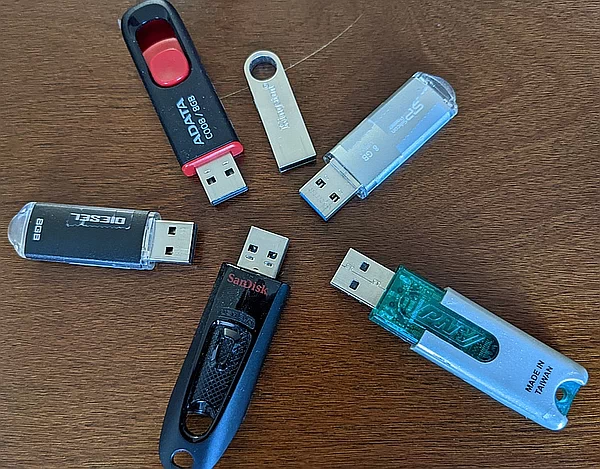
Small USB flash drives (aka pen drives, aka USB sticks) can be surprisingly dangerous, both their software and their hardware.
If you need to read files on a USB flash drive, the safest way is with a Chromebook in Guest Mode. If you need to save a file on a flash drive, the safest place, again, is a Chromebook.
If the files on the flash drive are malicious, that is another topic. However, the flash drive itself may attempt to attack your Operating System. The ChromeOS system on a Chromebook is both less likely to be attacked and more likely (compared to Windows, macOs, Linux) to resist any attack - especially in Guest Mode.
Even worse, a flash drive may attempt to physically destroy parts of the computer that it plugs into. In this case, the Chromebook can serve as a sacrificial lamb - better to destroy a cheap Chromebook rather than an expensive or important computer.
Any newly purchased flash drive should be initialized from a safe environment and a Guest Mode Chromebook is perfect for this. Re-initializing also applies to any flash drive where you do not need to read the files that it contains.
DEFENSES
If you must use Windows (not a good idea) then a somewhat safe environment for a USB flash drive is the Windows Sandbox in Windows 10 Professional and Windows 11 Professional (Enterprise version too).
April 6, 2026: Any USB drive or cable you plug in might be a silent killer by Brian Livingston for AskWoody.com. The article includes examples of malicious USB flash drives and describes how a USB drive can appear as a keyboard to Windows and enter commands to hack the system. It also points out that physical USB drives (and cables) give bad guys several ways to avoid detection by traditional security software. One defense against malicious USB cables is a $40 USB dongle sold by Hak5. A defense against malicious flash drives mentioned briefly in the article is a Raspberry Pi USB sanitizer. Sadly, the article says nothing about using a Chromebook. The Ask Woody website is focused on Windows which seems to have blinded them to a great defense.
February 1, 2021: Using Caution with USB Drives from CISA. Not worth reading.
VALIDRIVE
For Windows users, Steve Gibson offers his free ValiDrive program. I highly recommend it. The program does three things
- It verifies that the flash drive is actually the size it says it is. There are many flash drives on the market (certainly sold at Amazon) that do not have the storage capacity they claim to have. This is a big scandal because these scam devices not only lie about their capacity, they also lie to the operating system about actually having written data.
- It runs speed tests for both reading and writing
- It verifies that 576 sections of the flash drive are perfectly functional for both reading and writing.
ValiDrive is a single EXE file, thus there is nothing to install and the program is portable.
DATA ROT
If left unused for long enough, an SSD (or a USB flash drive) can lose data. The experiment described below showed a non trivial amount of data rot after 2 years of neglect.
April 16, 2025: Unpowered SSD endurance investigation finds severe data loss and performance issues by Mark Tyson of Toms Hardware. Quoting: "You may not know it, but SSDs will lose data after a period of time if they are simply left unplugged, which can be a serious threat to your data ... A year-two update on the how long can SSDs store data unpowered video series is another reminder about the importance of regularly refreshing your backups with a bit of juice ... I have also experienced SSD data loss after leaving a Mini PC unpowered for just six months or so ... On return, Windows refused to boot or be repaired, but a reformat and reinstall seemed to return everything to normal." The article is about SSDs, but it is safe to assume it also applies to USB Flash Drives.
April 29, 2025: On Episode 1023 of his Security Now! podcast, Steve Gibson discussed the above experiment, explained the low level physics behind the data rot and added: "... temperature is crucially important. Several years ago we covered a piece of news that noted that offline SSDs stored in hot data centers tended to lose their data more quickly than the same SSDs stored in a cool environment. Heat inherently agitates electrons and increases the probability that one will make it across the cell’s insulating barrier. So if you do have any offline SSDs or thumb drives where you have important data stored, I’d give them a full data rewrite pass with SpinRite at Level 3, then put them in a zip-lock bag in a refrigerator, or at least store them somewhere cool."
USB CABLES
I first heard of the Malicious Cable Detector by O.MG in August 2023. It claims to detect all types of malicious USB cables. At the time, it sold for $40.
February 26, 2025: How to tell if your USB cable is hiding malicious hacker hardware by Dominic Bayley for PC World. Malicious USB-C cables are designed to look just like regular cables. A foolproof solution, though not really practical, is industrial level scanning, specifically a 2D X-ray image and a 3D CT scan.
HARDWARE ATTACKS
On the hardware side, the articles below show that a USB flash drive can both explode (when a person is the target of bad guys) or destroy the computer it connects with.
The first I had heard about exploding USB flash drives was in March 2023 as detailed in the articles below. As soon as the flash drive got power from the USB port in a computer, it exploded.
- Journalist hurt by exploding USB bomb drive by Thomas Claburn for The Register. March 22, 2023
- Journalist plugs in unknown USB drive mailed to him - it exploded in his face by Scharon Harding for Ars Technica. March 22, 2023
The defense here is a USB extension cord, preferably 6 feet or longer. Plug the cord into the flash drive and then stand far away from the flash drive when you plug the other end of the extension cord into a computer. Maybe even have a barrier between the flash drive and yourself. This is yet another reason to use a Chromebook for USB flash drives as they are, generally, cheaper than other computers. Then too, the below.
- 'USB Killer' flash drive can fry your computer's innards in seconds by Dan Goodin for Ars Technica. October 14, 2015. Booby-trapped USB stick delivers 220-volt charge to attached computer.
Other than avoiding anything but a brand new flash drive, the defense here, yet again, is a Chromebook. This time a very cheap one to serve as the sacrificial lamb, so to speak.